Your Shopify store may be losing visibility before your ads, creative, or budget even get a chance to perform.
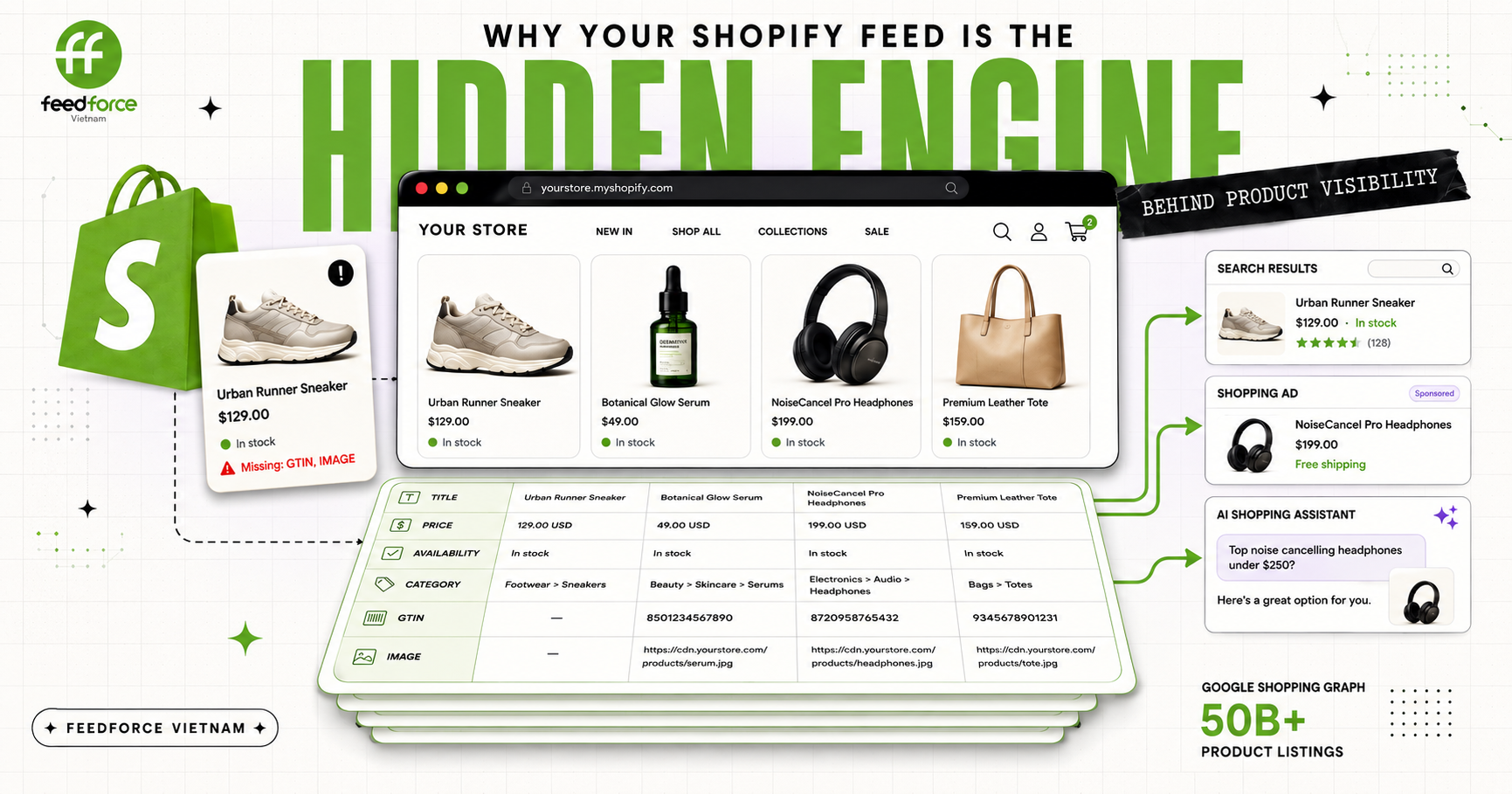
Google’s Shopping Graph now contains more than 50 billion product listings—and more than 2 billion of them are refreshed every hour. In a marketplace moving at that speed, an incomplete or poorly structured feed is not a minor backend issue. It can cause products to be misclassified, matched to fewer relevant searches, displayed with outdated prices or availability, or disapproved altogether.
For Shopify brands, the product feed is the hidden engine behind product discovery. It tells shopping platforms and AI-powered commerce systems what you sell, how each item should be understood, and whether the information can be trusted. If that foundation is weak, every feed-driven campaign and shopping channel built on top of it starts at a disadvantage.
I. What Is a Shopify Product Feed?
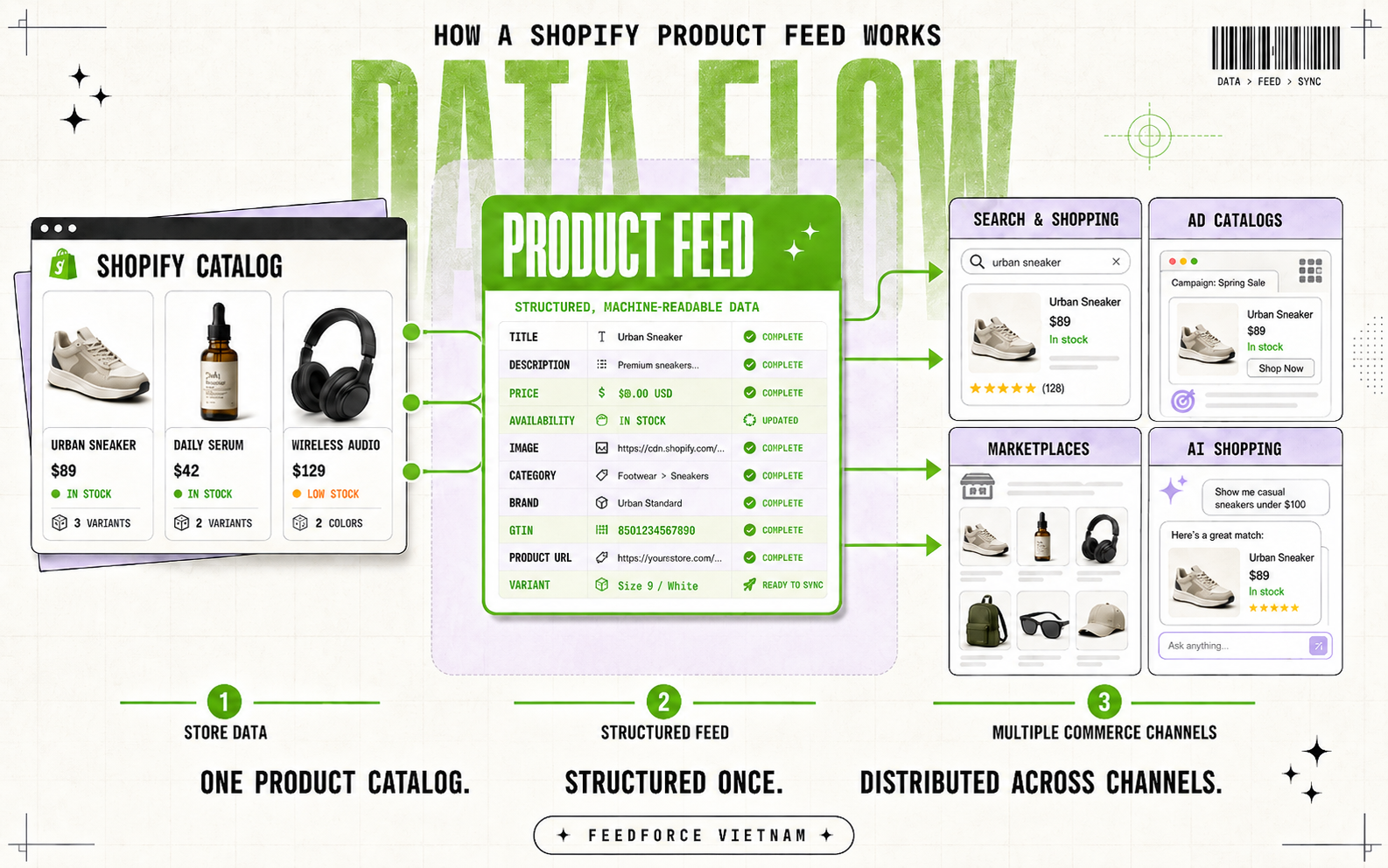
A Shopify product feed is a structured set of product information that Shopify sends or synchronizes with external commerce platforms. Instead of asking each platform to interpret a storefront visually, the feed provides machine-readable details such as product titles, descriptions, images, prices, availability, categories, brands, identifiers, product links, and variant information.
Despite its name, a product feed is not always a single spreadsheet, CSV, or XML file. For many Shopify stores, product data is transferred automatically through a sales channel, app, API, or catalog connection. For example, Shopify’s Google & YouTube channel can synchronize eligible products with Google Merchant Center, where the submitted data helps Google categorize products and match them with relevant searches. Some platform-specific attributes may still need to be added because they are not included in a store’s standard product information.
A product feed should also not be confused with a product page or product structured data:
A product page is the customer-facing page where shoppers view and purchase an item.
Product structured data is markup embedded in that page to help search engines understand its content.
A product feed is the data layer used to distribute and update product information across shopping, advertising, marketplace, and AI-powered discovery channels.
In simple terms, your Shopify storefront presents products to people. Your product feed explains those products to machines.
II. Why Product Feed Quality Matters for E-commerce Performance
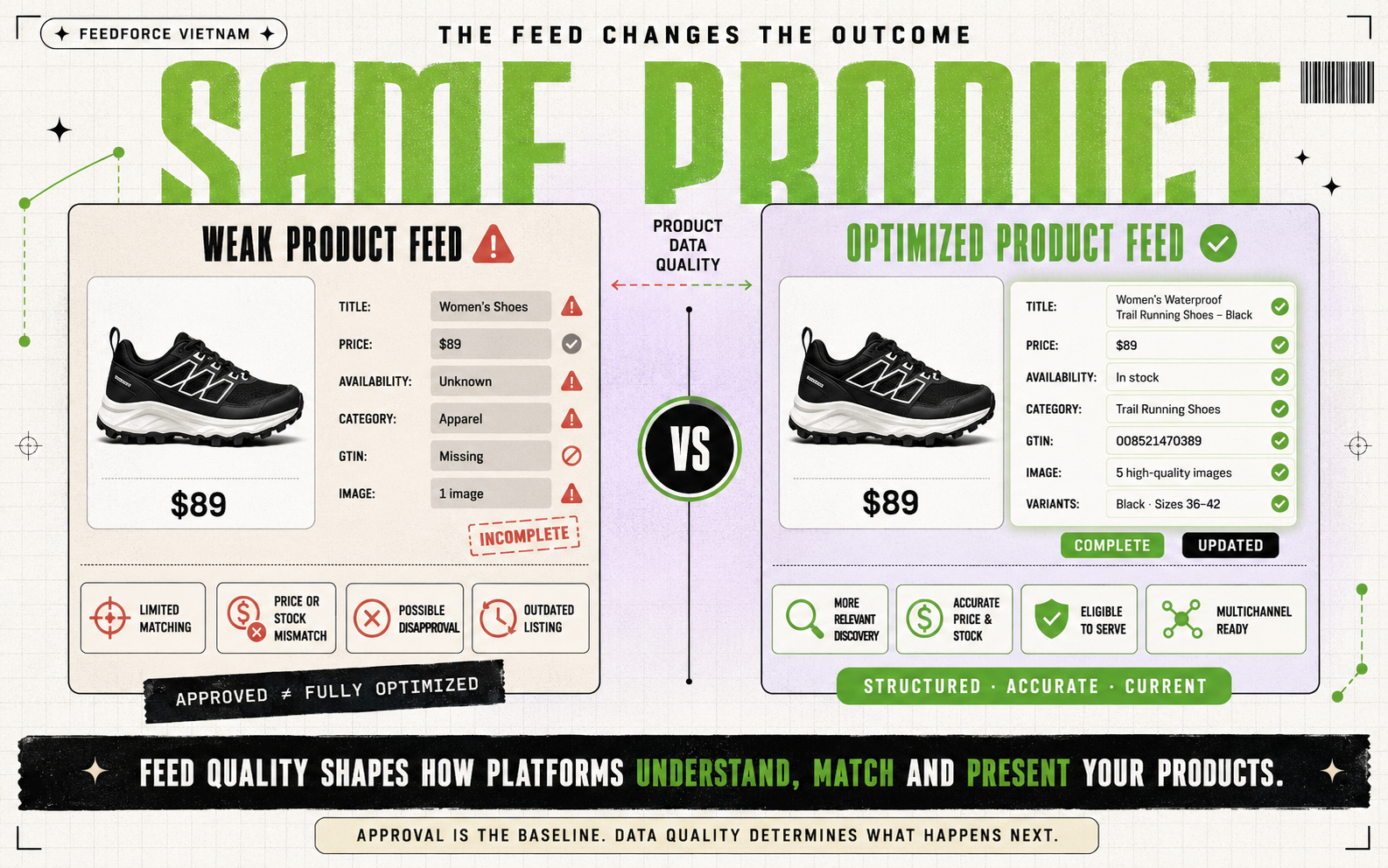
A product feed does not have to be rejected to hurt performance. It can be technically approved and still be too incomplete, generic, or outdated to help commerce platforms understand a product or to connect it with the shoppers most likely to want it.
This is especially important on Google Shopping, where ads use Merchant Center product data rather than traditional keywords to determine when and where products may appear. In other words, product feed quality is part of the same foundation we discussed in our article on combining Organic Search with Paid Ads for foreign brands in Vietnam: before scaling paid acquisition, brands need the right data, website, and content signals in place so both platforms and customers can understand what is being offered. The feed is not simply a list of items behind the campaign. It is one of the primary inputs that platforms use to evaluate product eligibility, relevance, accuracy, and presentation.
It affects whether products are eligible to appear
Every commerce channel has its own data requirements. Missing required attributes, unsupported values, policy violations, or inconsistencies between the feed and product page can prevent an item from appearing.
Price and availability are particularly sensitive. If the feed says that an item is in stock or available at a certain price while the landing or checkout page shows something different, the product may be disapproved until the issue is corrected.
Approval, however, should be treated as the minimum requirement—not proof that a feed is fully optimized.
It helps platforms match products with relevant demand
Product titles, descriptions, categories, brands, identifiers, images, and variant attributes give platforms the context needed to classify an item.
Compare a generic title such as “Women’s Shoes” with “Women’s Waterproof Trail Running Shoes – Black.” The second provides clearer signals about the product type, audience, use case, and color. The same principle applies to attributes such as size, material, GTIN, product type, and availability.
Google explicitly recommends submitting all applicable attributes and as many relevant recommended fields as possible because more complete product data increases the chance of appearing for relevant searches.
It protects campaign efficiency and customer trust
A strong advertisement cannot compensate for a feed that sends shoppers to the wrong variant, displays an outdated price, or promotes an unavailable item.
These problems can waste clicks, interrupt campaigns, and create an immediate gap between what shoppers were shown and what they find after visiting the store. Accurate and frequently updated data helps keep product listings, landing pages, and checkout information aligned.
It makes the catalog easier to scale across channels
A well-maintained Shopify catalog can support Google Shopping, free product listings, catalog-driven advertising, marketplaces, and emerging AI-powered discovery channels. As we discussed in our article on GEO and the future of organic visibility in AI Search, brands now need to think beyond traditional search rankings and ensure that their content, products, and data can be understood, trusted, and surfaced by AI systems.
Feed optimization does not guarantee higher sales or stronger ROAS. It does something more fundamental: it gives each platform better information with which to understand, approve, match, and present the products a brand wants to sell.
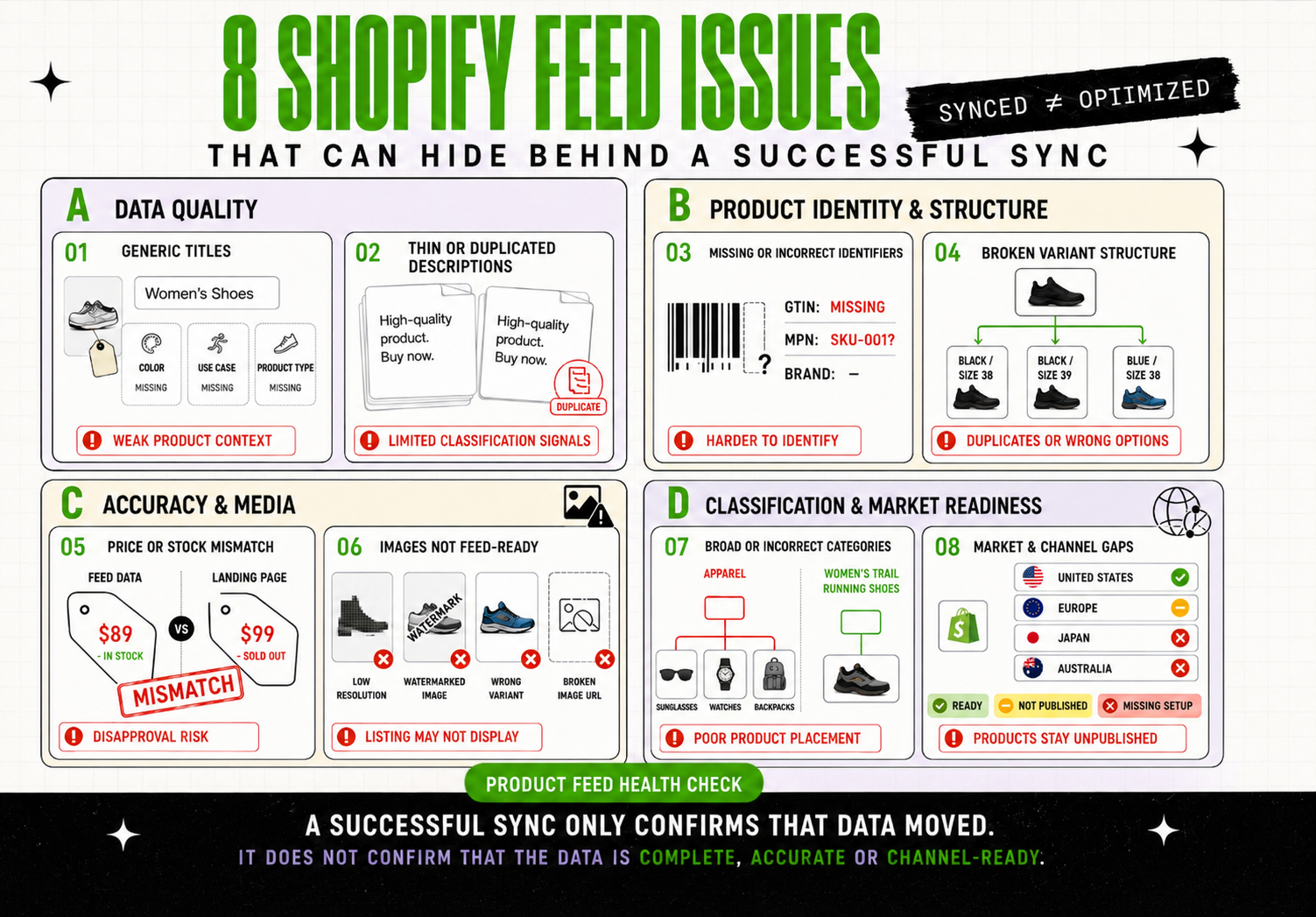
The most damaging feed problems are not always the ones that stop products from syncing. A catalog can appear active and approved while incomplete or inaccurate data quietly limits how well products are classified, matched, and displayed.
The following issues are easy to overlook—especially when a Shopify catalog grows across more products, variants, markets, and sales channels.
1. Product titles that are too generic
Titles such as “Running Shoes,” “Face Cream,” or “Black Dress” provide little context about the product’s audience, attributes, or use case.
A title may be technically valid but still omit valuable details such as brand, product type, color, material, size, or distinguishing features. Repeating the same title across multiple variants can also make products harder to differentiate.
2. Thin or duplicated descriptions
Many Shopify stores reuse supplier descriptions, copy the same text across similar products, or submit descriptions containing almost no useful product information.
Descriptions should explain what the product is and include relevant characteristics. Promotional language, shipping messages, excessive capitalization, or unrelated text can make the data less useful for product classification.
3. Missing or incorrect product identifiers
GTINs, brands, and MPNs help platforms recognize specific products and distinguish them from similar items.
A common mistake is leaving identifiers blank even when valid identifiers exist, submitting Shopify SKUs as GTINs, or marking a product as custom-made simply to avoid providing the required data. Incorrect identifiers can be more harmful than leaving an optional field empty.
4. Price and availability that fall out of sync
A product feed may continue showing an old price after a sale ends or mark an item as available after it sells out.
These mismatches often occur when updates to Shopify, structured data, the feed, and the checkout experience do not happen at the same time. They can create a poor customer experience and may cause affected products to be disapproved.
5. Variants that are not structured correctly
Size, color, material, and other variants should represent distinct purchasable options while remaining connected to the same parent product.
Problems occur when variants share incorrect identifiers, use inconsistent attributes, lead to the wrong landing page, or are submitted as unrelated products. This can produce duplicate listings or send shoppers to an option that does not match what they selected.
6. Categories that are too broad or inaccurate
A Shopify product category, internal product type, and platform-specific category do not always serve the same purpose.
Relying only on a broad label such as “Apparel” or “Accessories” can leave platforms with insufficient context. Incorrect categorization may also trigger irrelevant attribute requirements or place the product in unsuitable browsing experiences.
7. Images that work on the store but not in the feed
A product image may look acceptable on a Shopify theme while still being unsuitable for shopping listings.
Common issues include low resolution, placeholder images, promotional text, borders, watermarks, obstructed products, unsupported URLs, or an image that does not match the submitted variant. A broken or inaccessible image URL can prevent the product from displaying at all.
8. Market and channel settings that are assumed to be automatic
Installing a sales-channel app does not guarantee that every Shopify product is ready to publish.
Products may be excluded from a channel, missing platform-specific attributes, or submitted with the wrong language, currency, shipping setup, or target-market information. These issues become more common when a store expands into multiple countries.
The central lesson is simple: successful synchronization only confirms that data was transferred. It does not confirm that the data is complete, accurate, well structured, or suitable for every channel.
IV. What a Well-Optimized Shopify Product Feed Should Include
A well-optimized product feed is not simply one with every available field filled in. It contains the product information that is relevant to each item, formatted correctly, kept current, and consistent with what shoppers see on the product page and at checkout.
The exact requirements vary by product category, target market, and sales channel. However, most strong Shopify feeds share the following foundations:
Feed element
What good product data looks like
Why it matters
Product title
Specific, readable, and led by the most useful product details, such as product type, model, color, size, material, or intended use
Helps platforms understand the product and connect it with more relevant searches
Product description
Accurate, original, and focused on features, specifications, materials, dimensions, and use cases
Adds context that may not fit naturally into the title
Brand and identifiers
Correct brand, GTIN, and MPN where these identifiers genuinely exist
Helps platforms recognize the exact product and distinguish it from similar items
Price and availability
Current values that match the product page, structured data, selected variant, and checkout experience
Reduces customer confusion and helps prevent mismatches or disapprovals
Product images
Clear, high-resolution images that accurately represent the product and selected variant, without obstructive text, borders, or watermarks
Supports product evaluation and gives listings a usable primary visual
Category and product type
The most specific relevant platform category, supported by a useful internal product taxonomy
Improves classification and makes channel-specific requirements easier to manage
Variant data
Unique variant IDs with consistent size, color, material, image, URL, price, and availability data, connected to the correct parent product
Helps platforms present the right purchasable option rather than duplicate or mismatched listings
Ensures that products are prepared for the market and placement in which they are intended to appear
Completeness should always be judged by relevance. A product should not be assigned invented identifiers, irrelevant attributes, or generic values simply to make the feed appear more complete. Incorrect data can make a product harder—not easier—for platforms to interpret.
The feed must also remain synchronized with the source catalog. Prices change, stock runs out, promotions end, variants are added, and product pages are updated. A feed that was accurate at launch can quickly become unreliable without regular monitoring.
The strongest Shopify feeds are therefore specific, accurate, complete where applicable, and continuously updated. They provide commerce and product-discovery systems with a dependable representation of what the store is actually selling.
V. How Shopify Brands Can Start Improving Their Feed
Product feed optimization does not need to begin with a complete catalog rebuild. The most practical approach is to identify the issues that currently limit product visibility, correct the underlying Shopify data, and then build a repeatable process for keeping it accurate.
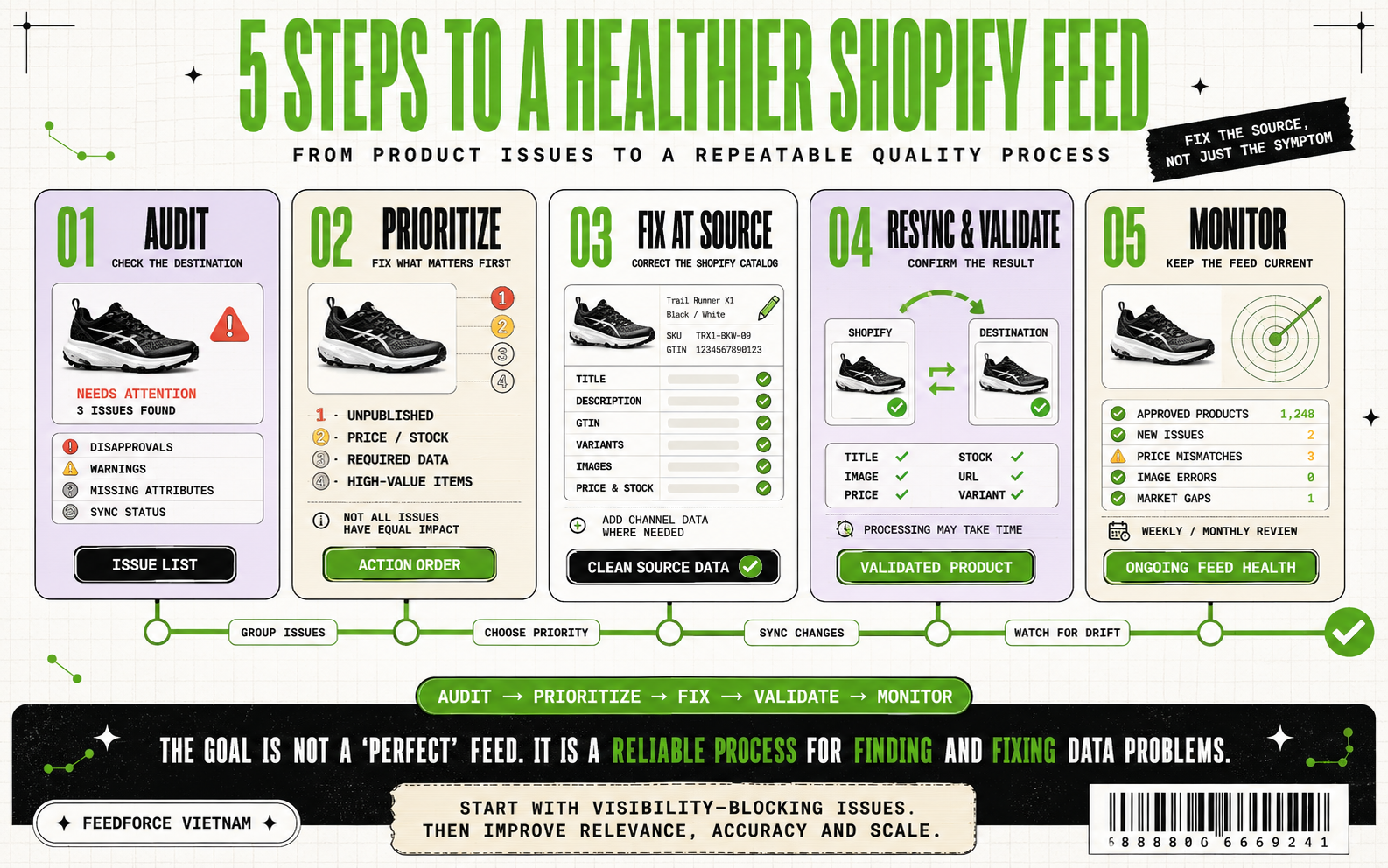
Step 1: Audit the feed from the destination platform
Start by reviewing how products are received—not only how they appear inside Shopify.
In Google Merchant Center, check the Needs attention section for disapproved products, warnings, missing attributes, policy issues, and mismatches. Shopify brands using the Google & YouTube channel should also review product status and synchronization settings inside Shopify.
Group the findings by issue type rather than fixing products randomly. This makes it easier to identify catalog-wide problems such as missing GTINs, generic titles, unavailable images, or incorrect variant data.
Step 2: Prioritize what affects visibility first
Not every warning requires the same urgency.
Address issues in this order:
Products that are disapproved or unpublished
Price, availability, landing-page, or policy mismatches
Missing required attributes
High-value or high-traffic products with incomplete data
Recommended attributes that could improve relevance and presentation
This prevents teams from spending time polishing low-impact fields while important products remain unable to appear.
Step 3: Correct the source data in Shopify
Where possible, fix titles, descriptions, identifiers, images, variants, prices, and inventory in the Shopify catalog rather than repeatedly editing the same values on individual channels.
Then add any channel-specific information that Shopify does not store by default, such as a Google product category, target-market details, or attributes required for a particular product type.
Step 4: Resync and validate the result
After making changes, allow the connected channel to synchronize the updated data and verify that the expected values reached the destination platform.
Check the affected product—not only the account-level status—to confirm that its title, image, variant, price, availability, URL, and market settings are correct. Some issues require reprocessing or review before the new status appears.
Step 5: Turn feed quality into an ongoing process
A feed audit is not a one-time project. Products, inventory, promotions, policies, and channel requirements continue to change.
Create a regular review schedule and monitor:
Newly disapproved or unpublished products
Price and availability mismatches
Expired or inaccessible images
New products missing identifiers or attributes
Variant and market-expansion issues
Sudden changes in approved product counts
The goal is not to achieve a permanently “perfect” feed. It is to detect and resolve data problems before they quietly limit product discovery or interrupt active campaigns.
VI. When Should You Consider Professional Support?
Not every Shopify store needs an agency to manage its product feed. A smaller catalog selling in one market through a simple channel setup can often be maintained internally.
Professional support becomes valuable when product data is no longer a one-time setup task—but part of the infrastructure supporting campaigns, marketplaces, international expansion, and daily e-commerce operations.
Consider bringing in specialist support when:
Your catalog contains hundreds or thousands of products, variants, or frequently changing inventory records.
You sell across multiple countries, languages, currencies, or commerce channels.
Products are repeatedly disapproved, unpublished, or affected by price and availability mismatches.
Your Shopping, Performance Max, or catalog-based campaigns depend on product data, but no one can clearly explain why certain products are not appearing.
Product information is being corrected separately in Shopify, Merchant Center, advertising catalogs, or marketplaces.
Your development, e-commerce, and marketing teams do not have one clear owner for product-data quality.
You are expanding from Shopify into Southeast Asian marketplaces and need product, inventory, and order data to remain consistent.
If several of these situations sound familiar, the underlying problem is rarely one missing field. It is usually a system-level issue involving the source catalog, synchronization method, channel requirements, validation process, and internal ownership.
Why work with Feedforce Vietnam?
Product-feed optimization sits between technology and marketing. As we discussed in our article on why digital marketing in Vietnam requires more than platform skills, the real challenge is rarely just operating a tool correctly. Correcting a data field may require Shopify development knowledge, while deciding which products and attributes to prioritize requires an understanding of advertising, customer demand, product readiness, and e-commerce operations.
**Feedforce Vietnam brings these capabilities together**. Our team can support brands across:
Shopify catalog and product-data review
Data-feed and channel-requirement mapping
Shopify store and custom app development
Product synchronization and validation
Tag implementation and measurement
Paid-media and e-commerce execution
Marketplace expansion across Southeast Asia
Ongoing monitoring, reporting, and improvement
This integrated approach helps prevent the feed from becoming an isolated technical file managed separately from the campaigns and sales channels that depend on it.
For international companies, Feedforce Vietnam can also coordinate projects in English, Japanese, and Vietnamese—helping regional teams, local operators, developers, and marketers work from the same product-data requirements.
With more than 60 completed projects and over 10 years of experience across e-commerce and digital marketing, Feedforce combines local market understanding with the technical and performance expertise needed to turn Shopify product data into reliable commerce infrastructure.
Not sure where your feed is breaking down?
Start with a conversation.
Share your Shopify store, target markets, active sales channels, and any product warnings or disapprovals you are currently facing. Feedforce Vietnam can help identify where the most important risks sit, what should be corrected first, and what type of support your catalog actually needs.
Check out our guide to mastering Shopify's marketing tools for Vietnam. Learn strategies to boost visibility and engagement, including email marketing, social media, SEO, and analytics. Discover how to integrate Shopify with local marketplaces and global platforms like Google Analytics.




.png)