The biggest lesson was not about the tool, though. What I actually had to face was an older question: what does it mean to delegate work? The same questions you meet when handing work to people arrive faster, and with less mercy.
What I learned comes down to three things. Preparing context. Drawing the line of trust. And retiring what fails.
Context is the real asset
The first thing I learned is that output quality depends less on how smart the model is and more on the context you prepare around it.
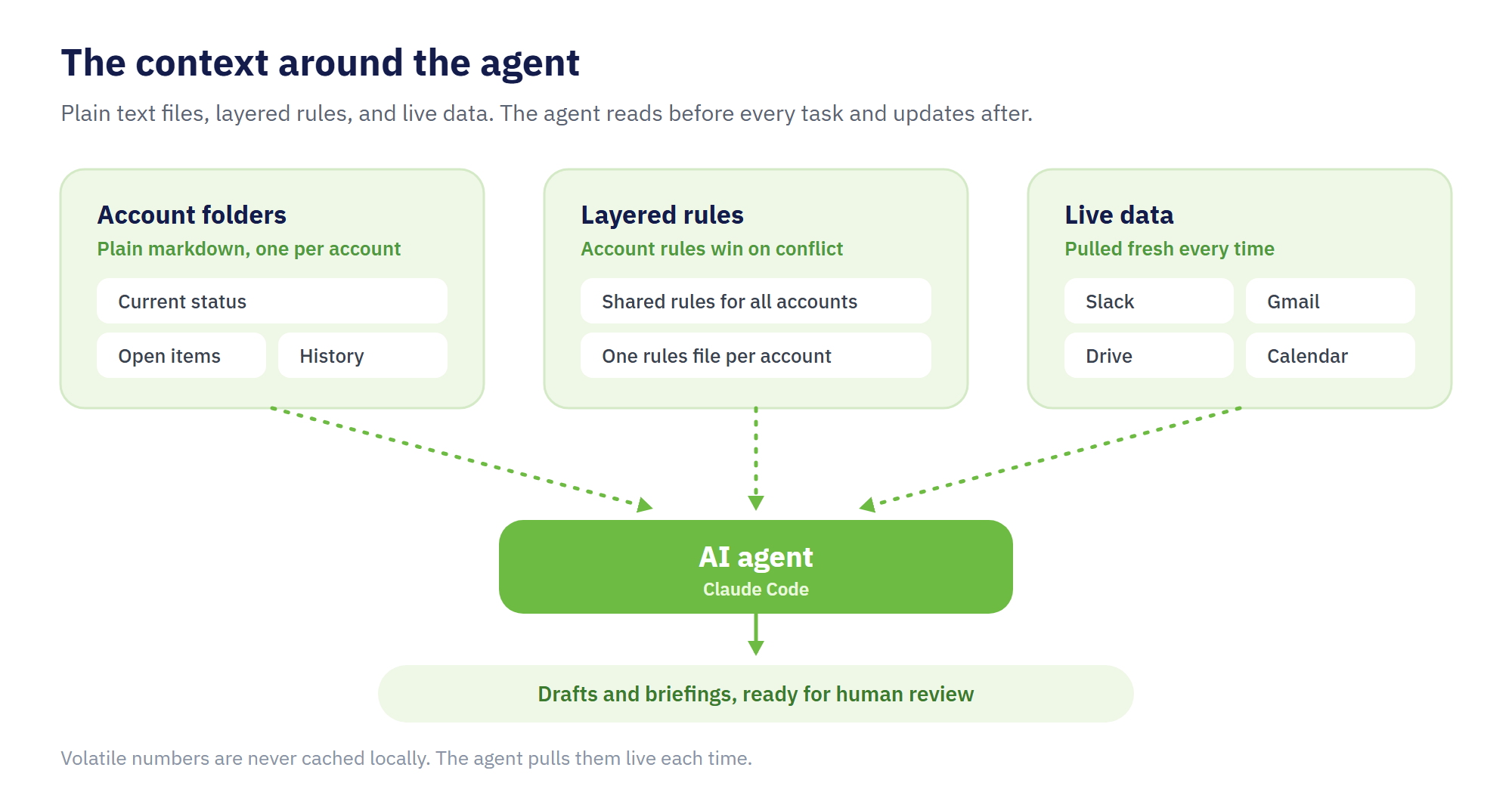
In my setup, every account has one folder of plain markdown files. Current status, open items, history. Nothing fancy, just text files.
The agent reads them before every task and updates them after.
Rules are layered. One file holds the rules shared across all accounts: which language to use for whom, formatting, how to handle confidential information. On top of that, each account has its own rules file.
Numbers and recent conversations are pulled live from Slack, Gmail, Google Drive, and Calendar every time. I do not let the agent rely on saved copies. It cannot tell that a copy is stale, so it will report last month's numbers as today's facts.
In short, this is no different from onboarding a new team member or a freelancer. A good brief gets good work back. Anyone who works in an agency already knows this.
The difference is the price of a missing brief. A person asks questions to fill the gaps. An agent does not ask. It fills the gaps itself, with full confidence, even when it is wrong.
Draw the line of trust deliberately
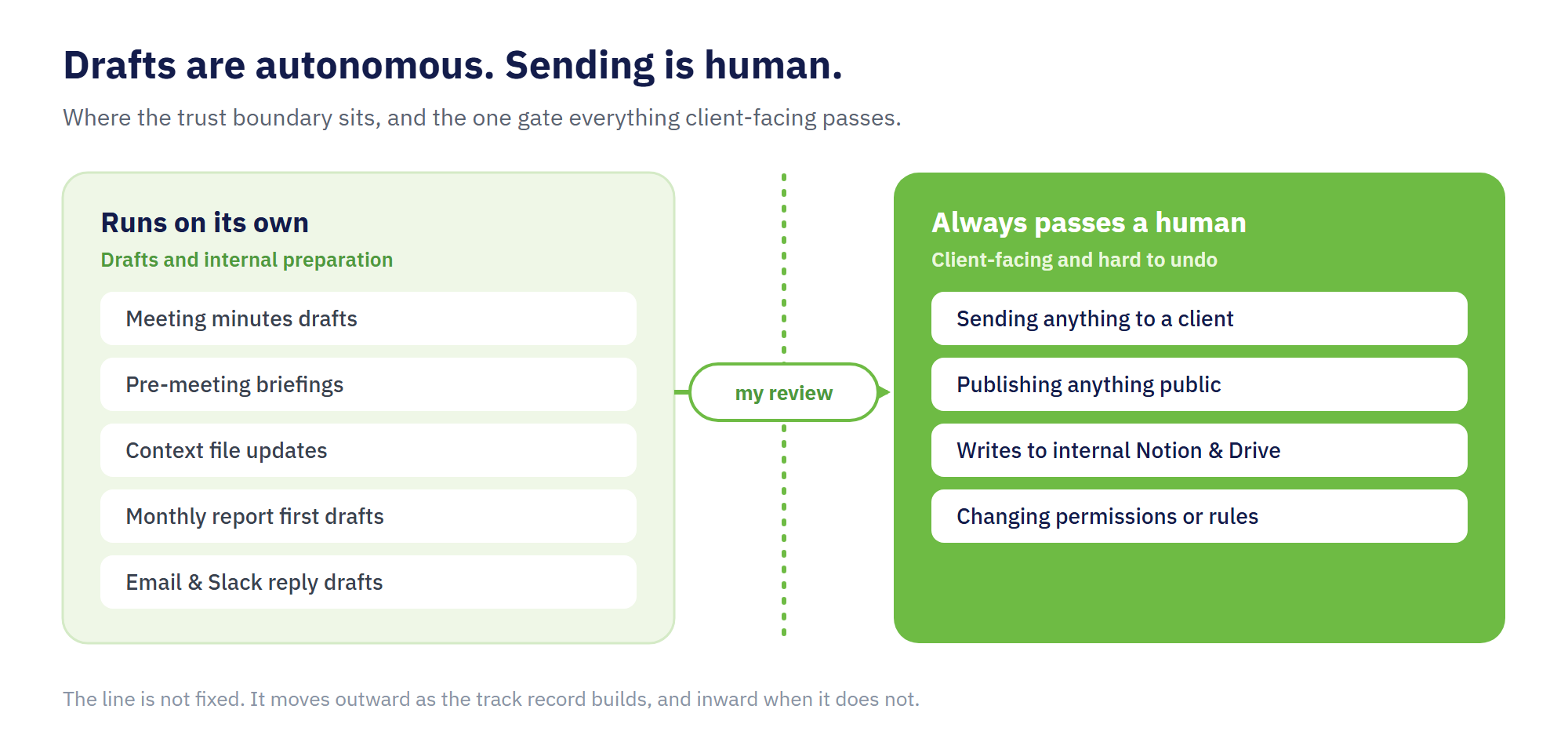
My setup has one absolute rule. Drafts are autonomous. Sending is human.
Meeting minutes, pre-meeting briefings, weekly reviews, first drafts of monthly reports, reply drafts for email and Slack: the agent creates all of these on its own. Anything that reaches a client or goes public, I review and send myself.
One concrete example. Apart from drafts and its own context files, the only thing the agent can write without asking is a marker on my calendar showing when each automated routine will run. Even that permission is create-only. The agent can add a marker, but never change or remove one.
Create-only, because the failures look different. A failed create adds one piece of visible junk I can delete. A failed update or delete quietly corrupts information that already exists.
I set permissions by asking what happens when this fails, not what would be convenient.
The same thinking covers security and personal data. Client information is separated by workspace, and the list of things that must never appear in any output sits at the top of the shared rules file. Permissions stay narrow, so one mistake cannot become an incident.
This may sound excessive. But the line is not fixed. Where the track record builds, I move it outward, one step at a time.
It also moves inward. Writing to our internal Notion and Drive still requires my approval, item by item. The agent has not earned that trust yet.
In a client business, trust is the product. So sending stays on the human side, all of it.
Retire what fails, audit what runs
I should also share what did not work.
For a while, I ran a routine that checked incoming email on a schedule and drafted replies automatically. I killed it quickly. Drafts written without enough context needed rewriting anyway, and because the routine ran on a timer, the situation had sometimes moved on by the time a draft appeared.
I demoted it to an on-demand tool. It runs only when I point it at a specific email.
Looking back, the failure was in the trigger. Minutes and briefings work because the trigger carries its own context: a meeting that just ended, a client call tomorrow morning. A scheduled sweep of the inbox is triggered by time alone and brings no context with it.
Since then, my test for automating anything has been whether the trigger carries the context.
I expect more failures like this, so I keep two habits.
First, every scheduled routine is recorded in a single registry file. What runs, when, and why. Additions and retirements go into that file the moment they happen.
Second, twice a month a routine audits the setup itself. Abandoned tasks, routines running more often than they should, permissions drifting from the rules. What it finds becomes a list of proposed fixes, and nothing is executed until I approve it.
The latest audit caught a few of my own mistakes. A permission that should have been removed was still in place. A routine had run three times on a model I never meant to assign to it.
Automation is much easier to add than to maintain.
What actually changed
For scale: about 18 scheduled routines, and a dozen or so workspaces across accounts.
The clearest change is where my time goes. Less of it goes to gathering and arranging information, and more to judging what it means. My most active accounts are already refreshed by the time I start the day, a briefing is ready before each meeting, and the monthly review starts from a draft that is most of the way there.
None of this is free. Maintaining the registry and reviewing the monthly audit are now recurring work of their own.
For the first two or three days, building the system clearly took more time than it saved. After that, the balance flipped faster than I expected.
Even so, the reason I keep it running is that the time left over is different in quality. Delegating to an agent showed me how much of my work was preparation rather than judgment. The preparation I handed over comes back as time for clients' actual problems, the same shift we described in Work 2 Hours, Deliver 8.
And the judgment has new material now. Which line to move next. Which automation to retire. Which context to keep as an asset.
Feedforce Vietnam helps foreign brands run digital marketing and e-commerce in Vietnam, with AI-assisted operations behind the client work. More about our approach is on our marketing consulting page.
Feedforce Vietnam shares practical generative AI use cases for non-engineers, from multilingual ad analysis and proposal review to workflow automation in Google Workspace. The article shows how AI, paired with organizational design, can reduce friction and support smarter agency operations.
AI is changing how digital marketing teams work in Vietnam. This article explores how AI reduces manual tasks while increasing the importance of judgment, quality control, business understanding, and client-focused strategy.